Following the information in
Hello
I am using Gantt project for my private business.
I would like to modify roles of ressources ( for the moment, they are dedicated to software development).
Why role definition is not customizable?
How can I create my own roles list?
Thank You
René
I have added a new set of Resource roles
<roles roleset-name="Default">
<role id="0" name="undefined"/>
<role id="1" name="project manager"/>
</roles>
<roles roleset-name="SoftwareDevelopment">
<role id="2" name="developer"/>
<role id="3" name="doc writer	"/>
<role id="4" name="tester"/>
<role id="5" name="graphic designer"/>
<role id="6" name="doc translator"/>
<role id="7" name="packager (.rpm, .tgz, ...)"/>
<role id="8" name="analysis"/>
<role id="9" name="web designer"/>
<role id="10" name="no specific role"/>
</roles>
<roles roleset-name="Project">
<role id="11" name="optical design"/>
<role id="12" name="optical assembly"/>
<role id="13" name="mechanical design"/>
<role id="14" name="mechanical assembly"/>
<role id="15" name="electronic design"/>
<role id="16" name="software developer"/>
<role id="17" name="technical writer"/>
<role id="18" name="purchasing"/>
</roles>
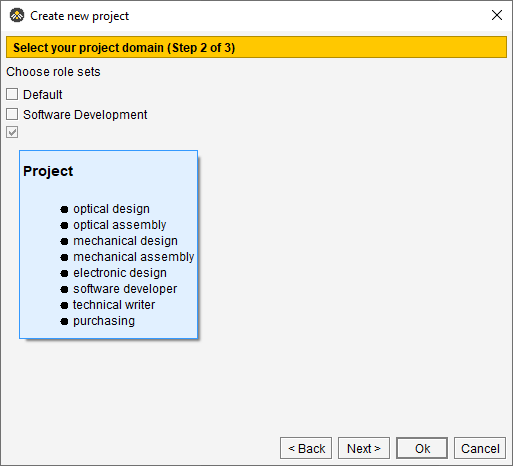
And things almost work as I would like. When making a project a new line for a role set appears on the step 2 page and the roles seems to be available, however the name of the role set is missing. Do I need to edit something else to get the role set name to appear?
csimeon
May 18, 2026, 9:29am
2
Same problem here, the roleset name does not appear
Thanks for reporting! I submitted a new bug report:
opened 12:27PM - 20 May 26 UTC
bug
1. Edit `~/.ganttproject` file and add a new role set:
```
<roles roleset-name=… "Default">
<role id="0" name="undefined"/>
<role id="1" name="project manager"/>
</roles>
<roles roleset-name="SoftwareDevelopment">
<role id="2" name="developer"/>
<role id="3" name="doc writer	"/>
<role id="4" name="tester"/>
<role id="5" name="graphic designer"/>
<role id="6" name="doc translator"/>
<role id="7" name="packager (.rpm, .tgz, ...)"/>
<role id="8" name="analysis"/>
<role id="9" name="web designer"/>
<role id="10" name="no specific role"/>
</roles>
<roles roleset-name="Project">
<role id="11" name="optical design"/>
<role id="12" name="optical assembly"/>
<role id="13" name="mechanical design"/>
<role id="14" name="mechanical assembly"/>
<role id="15" name="electronic design"/>
<role id="16" name="software developer"/>
<role id="17" name="technical writer"/>
<role id="18" name="purchasing"/>
</roles>
```
2. Start GanttProject and open `Project > New`
Expected: the new role set is visible in the wizard with its name. Actual: the role set appears, but there is no name label next to the checkbox.
<img width="1016" height="971" alt="Image" src="https://github.com/user-attachments/assets/ee4e71a6-7512-4f29-87e0-40afefacaf8d" />
This is fixed now. Will be available in GP 3.4
durian188:
I have added a new set of Resource roles
<roles roleset-name="Default">
<role id="0" name="undefined"/>
<role id="1" name="project manager"/>
</roles>
<roles roleset-name="SoftwareDevelopment">
<role id="2" name="developer"/>
<role id="3" name="doc writer	"/>
<role id="4" name="tester"/>
<role id="5" name="graphic designer"/>
<role id="6" name="doc translator"/>
<role id="7" name="packager (.rpm, .tgz, ...)"/>
<role id="8" name="analysis"/>
<role id="9" name="web designer"/>
<role id="10" name="no specific role"/>
</roles>
<roles roleset-name="Project">
<role id="11" name="optical design"/>
<role id="12" name="optical assembly"/>
<role id="13" name="mechanical design"/>
<role id="14" name="mechanical assembly"/>
<role id="15" name="electronic design"/>
<role id="16" name="software developer"/>
<role id="17" name="technical writer"/>
<role id="18" name="purchasing"/>
</roles>
And things almost work as I would like. When making a project a new line for a role set appears on the step 2 page and the roles seems to be available, however the name of the role set is missing. Do I need to edit something else to get the role set name to appear?
On a separate note, when teams start integrating project data across tools, some also look at automating workflow links between systems like planning and marketplaces—especially when they need to sync operational data with external platforms like Etsy. In such cases, tools like integrate etsy workflows can help reduce manual overhead, though that’s more relevant once your project structure is stable.
From what you describe, it looks like you’re very close already — the role sets are being parsed correctly, but the label for the roleset itself is what’s not being displayed in the UI.
In GanttProject, role sets are often not fully dynamic in the sense that custom entries are only partially supported. The application typically expects a fixed set of predefined role groups internally, and anything outside that may still load the roles, but not properly render the roleset name in the interface.