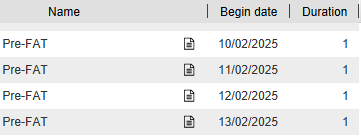
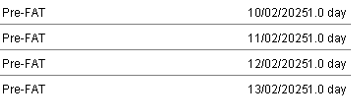
I tried exporting my Gantt as a PNG (for import to PPT) and noticed that the Duration field in my Task list has been rendered with a decimal. Given GanttProject does not support fractions of days for tasks, there’s no need to support fractions of days in the PNG export. For example, GanttProject shows “1” for a single-day task, but the PNG shows “1.0 days”.
As an example, this is my Task List:
And this is how that’s shown in the PNG export:
Hopefull that’s a simple change.
Also, I see the column spacings differ which is causing text to overflow and the date appears too close to the duration, which makes them hard to differentiate.
Normally, the version reported in the About dialog tells the truth. It is possible to trick it, though. If you suspect that something is not right with your installation, you can remove the directory .ganttproject.d/updates from your home folder and let GanttProject update the next time.
If your home folder is not on your portable device, you can copy the contents of .ganttproject.d/updates into plugins folder inside your installation directory. When GanttProject starts, it reads the modules from two folders: from the installation directory and from the home folder.