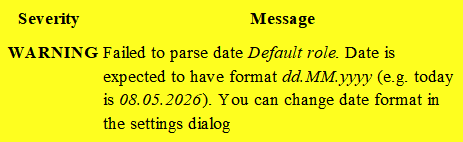
I tried formatting the spreadsheet column of [Roles] as text and not to interpret as date
(I use WPS Calc an Excel clone). Still at import I get the date message.
I also tried preceeding the data with an apostrophe, for example: ‘0:100.00 does not work
1059 Gantt 202605.zip (40.5 KB)
Contains the .gan and four files, as follows:
1059 Gantt 202605-R1544(out).csv is the .csv export from the .gan file, this imports correctly
1059 Gantt 202605-R1548(xls).csv is the .xls export from the .gan, this imports correctly
1059 Gantt 202605-R1555(edit).xls is the .xls saved from the previous WITHOUT any editting except the save. Seems that the Save gives formatting information because the warnings start, so GanttProject now assumes the date format
1059 Gantt 202605-R1559(FormatText).xls is the .xls after editing the previous and applying text formatting to the column. I tried this way to override the problem by saving as with text format specifically, rather than date. Still same warnings.
When I get the warnings I loose all the Resource information and assignments
Since the formatting is saved by the spreadsheet program, it is not strictly your concern, but I would appreciate your ideas how to override the problem
Saveas .csv (unclick tickbox Append Extension and add extension manually)
This save and import would be part of a procedure where I can copy tasks quickly, drag and drop to repeat features across several tasks - in short use the powerful multi-line records tools and filtering tools in excel
The complete workflow:
Export from GP
Edit with Excel or WPS
Correct formatting as above
Import to GP
It’s a shame about the added steps, it’s not a simple, clean workflow
But edit and out files are quite different. The resources block is shifted, the outline number column in the task section is in different places. This is not just formatting.
I moved the resources block to the place where it was supposed to be (starting from A65) and it imported fine (with some other warnings related to the resource assignments)